The Booking.com Property Page Score: What It Measures, What Moves It, What 18% Really Means
Sources: Booking.com Partner Hub help pages (Property Page Score, ranking and visibility, optimizing your property listing, photo requirements) verified via Playwright on 2026-05-11. Booking.com Connectivity developer docs (Property Scores API breakdown endpoint), captured 2026-05-11. Practitioner cross-validation via Hostfully + Hostaway updated late 2025/early 2026.
Key takeaways
The Property Page Score is the only 0-to-100% content scoreboard a major OTA publishes directly to operators. As of April 2026, Booking lists it as one of five named ranking factors on its public search-results-and-visibility page 1. The famous "up to 18% more bookings" figure comes from Booking's own data and compares 100%-complete listings against properties with "incomplete content," not against the median property in your area 23. That asymmetric framing is worth understanding before treating 18% as a guaranteed lift.
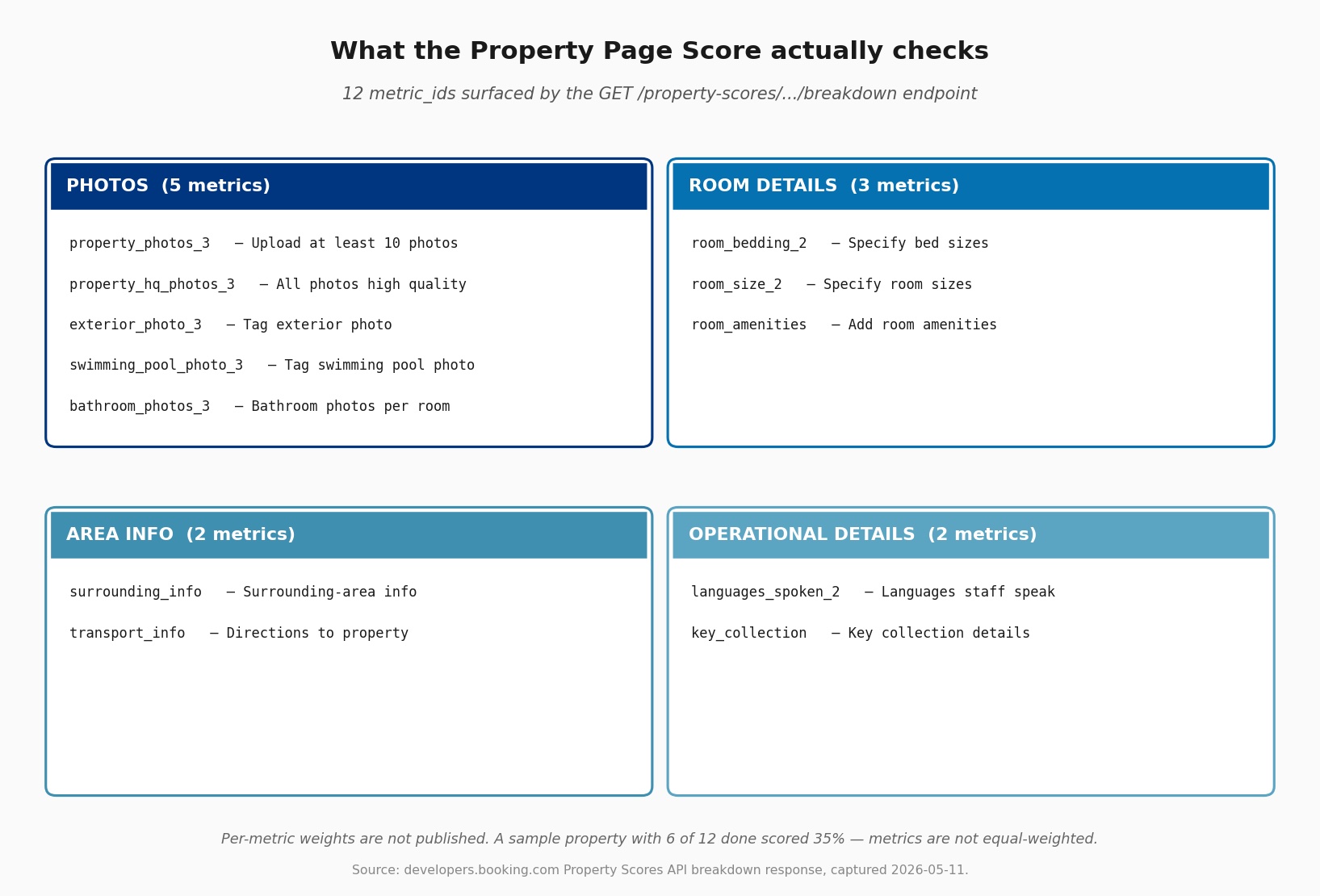
What the score actually checks is observable. The Property Scores API breakdown endpoint returns the score plus a list of named metrics with done/not-done flags; the published sample surfaces 12 of them across four clusters (photos, room details, area info, operational details) 4. Per-metric weights are not published. A property with 6 of 12 metrics complete can score 35%, which means the weighting is uneven and photos carry more than their share.
The step-by-step fix below is the climb from a thin listing to a complete one. The "How OTALift surfaces this" section maps the score's input categories to OTALift's listing-audit validators, including what we surface today and what's still aspirational. The honest answer to "what does 18% really mean": it's an asymmetric ceiling on a published ranking factor, and the work to capture it is concrete because Booking tells you, in the Extranet and via the API, exactly which metrics are open.
Why it moves bookings
Booking promoted Property Page Score into the 5-factor ranking list. As of April 2026, the Partner Hub's "Search results, ranking and visibility" page names five factors: conversion, average daily rate, cancellations, Property Page Score, and Guest Review Score 1. That last factor used to be "response time" or "availability" in earlier versions of the same page, and the practitioner ecosystem hasn't caught up. Hostaway's December 2025 ranking guide still cites the old list 5. The shift matters because content completeness is no longer a side concern that feeds conversion indirectly. It's a named lever.
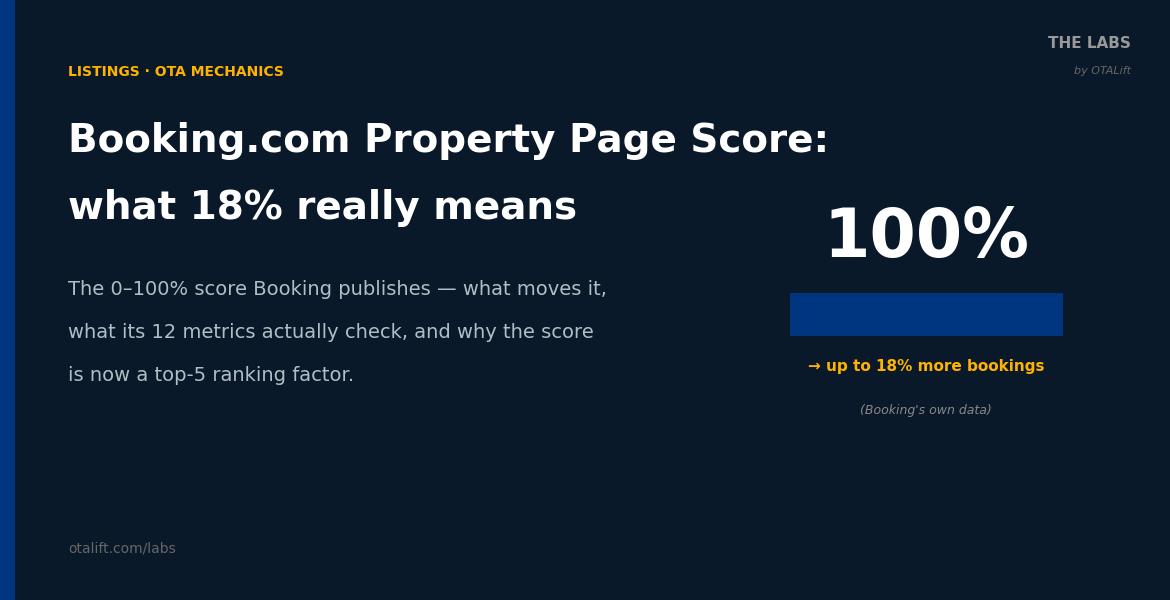
The 18% claim is Booking's own data, on a deliberately asymmetric cohort. Booking publishes the same wording twice across the Partner Hub: "Properties with a 100% property page score get up to 18% more bookings than properties with incomplete content" 23. Two things matter here. First, "Our data" means Booking-internal analytics, not a third-party study. Second, the comparison is 100% vs incomplete, not 100% vs the median. So 18% is the gap to the worst case, not to your neighbor at 88%. Read it as a ceiling, not a forecast.
Booking publishes a cohort comparison most operators never see. The Property Scores API returns score, max_score, and area_average_score in every response 4. The doc's sample property is scored at 32 in an area averaging 98. That's a published benchmark against neighbors, and it's where the operator-facing scoreboard story gets sharper than the Partner Hub help page suggests. If your score sits at 70 in an area averaging 95, you're not just below your potential. You're below the neighbors winning the impression auction every day.
Content completeness is the filter-visibility gate. Booking states the mechanism plainly: "if your property offers something you haven't listed, it may disappear from search results when travelers apply filters" 3. Declared facilities feed both the description and the filter index. Missing facilities silently drop the property from filtered searches. The score's facilities check isn't decorative. It's the gate to filtered-search inclusion, where most narrow-intent traveler queries fire.
Photos drive scrutiny, and the score weights them prominently. Booking publishes that 63% of travelers use photos as their primary source of information when booking 3. The API breakdown reflects that prominence: 5 of the 12 sample metrics are photo-related (count, quality, exterior, pool, bathroom), which spans more checks than any other cluster. Booking does not publish per-cluster weights, so the prominence is suggestive rather than conclusive, but it aligns with the 63% traveler-attention figure. When a property's score drops, the most common cause we observe is a photo-tag regression or a new room added without a hero shot.
The score is observable via API, not just a UI badge. The Property Scores API has two endpoints. A summary endpoint lists scores across an entire portfolio with the area_average for each. A breakdown endpoint returns the score plus a metrics array showing which checks are done and which are open 4. For connectivity-partner customers this is wirable into internal monitoring. For everyone else the same data renders in the Extranet, one property at a time.
What "great" looks like
A great Booking listing isn't a 100% score on a vanity screenshot. It's an operator who knows which of the 12 metrics carry the most weight, watches the score weekly, and treats the area_average_score as the real benchmark instead of the abstract 100%.
Example 1: A property that reads the API benchmark, not just the score
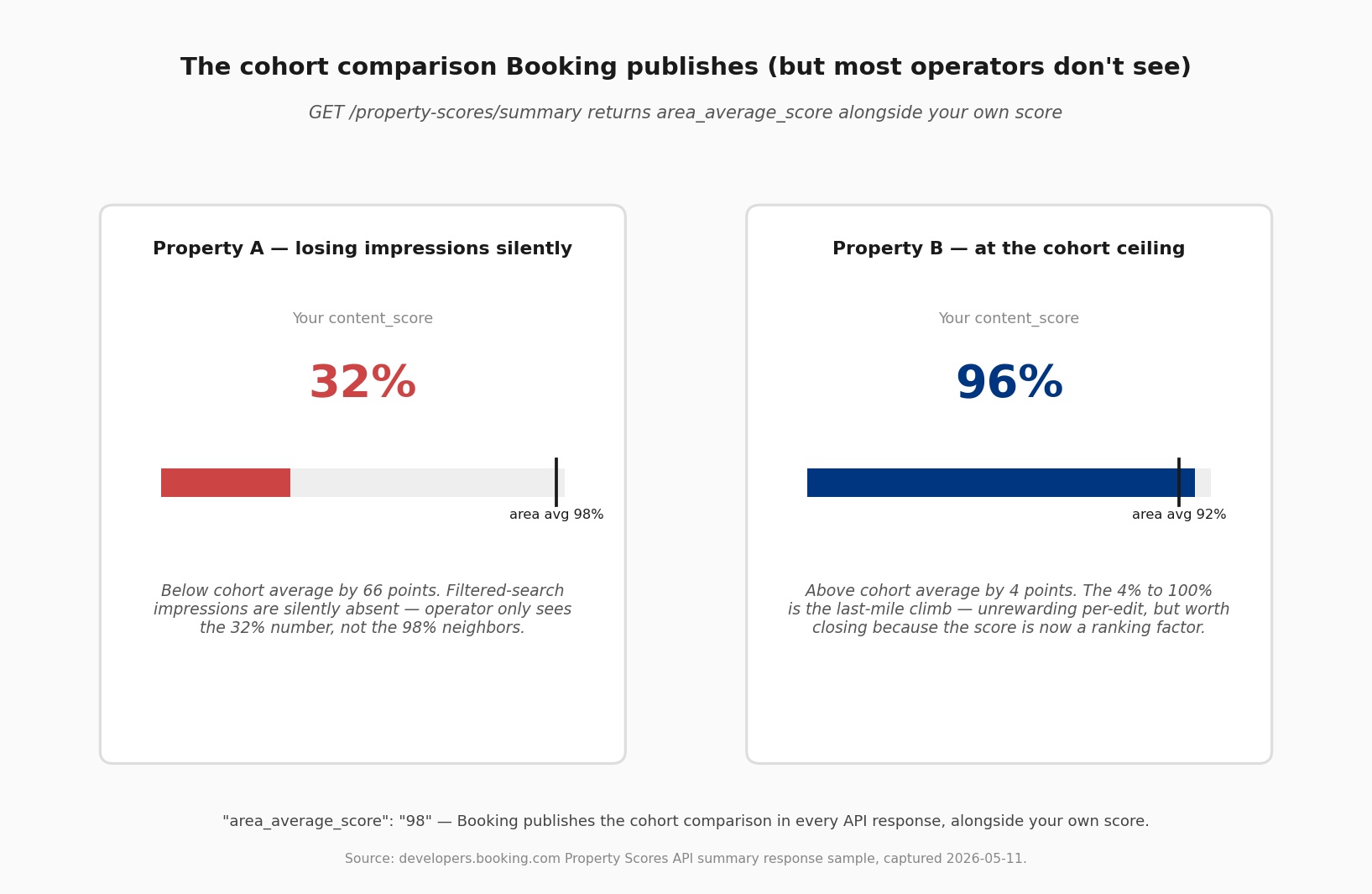
The property on the right is at 96% in an area averaging 92%. Its operator knows two things the property on the left does not. First, they are above cohort, so the dominant share of filtered-search impressions in their area belongs to them, not to a thinner-listing competitor. Second, the climb from 96% to 100% is the last-mile climb. Each metric_id closed is unrewarding individually but worth closing because the score now feeds ranking directly. They don't expect 4% in score to deliver 4% in bookings. They expect it to deliver a few more impressions on filtered searches, which compound. The pace depends on how much of the property's demand funnel runs through filtered queries; for niche-amenity properties (accessible rooms, pet-friendly, work-friendly badge), filtered impressions are the majority of the demand funnel.
Example 2: A property where every photo has a tag, and every room has its own hero
Booking's Photo API exposes a /tags taxonomy with structural labels: Shower, Toilet, Property building, Patio, Reception, Pool, and dozens more 6. The Property Page Score's photo metrics check coverage of specific tags (exterior, pool, bathroom) rather than just photo count. A great property doesn't just upload 25 photos and walk away. It maps each photo to a tag, ensures every room type has its own hero, exterior, and bathroom shot, and re-checks tag coverage when adding a new room. The score's photo cluster reads as fully done in the API breakdown, with done: 1 on each of the five photo metrics.
In the UI this looks like a polish detail. In the API breakdown it's the difference between property_photos_3: done=1 and bathroom_photos_3: done=0, which can be the difference between a 92% and a 96% score on an otherwise identical listing.
Example 3: A property that overrides the auto-generated description
Every property starts with a Booking-generated description composed from facilities, room details, and location 7. It reads fine. It's also generic by design, and it doesn't carry the character, neighborhood detail, or heritage that separates a stay at this property from any other property in the same category. A "great" operator overrides the default with two or three paragraphs in their own voice. The Property Page Score doesn't directly score "owner-written description" as a metric_id, but the Partner Hub guidance treats the override as a marker of complete listings, and the operator's voice carries into how the listing reads at the search-results-card level, where conversion is decided.
Common failure modes
1. Reading "up to 18%" as a guarantee. It's the published ceiling, and the cohort is incomplete-content properties, not the median. The actual lift depends on how strong your local cohort is. A property whose area_average is already 95% has less ceiling to capture from the 18%; a property whose area_average is 65% has much more. Booking does not publish the per-cohort gradient, so treat 18% as a ceiling rather than a forecast against your specific market. Booking is honest about the asymmetry. The "up to" wording is doing real work.
2. Stopping at 90%. Most properties plateau here because the remaining 10% is room-level work: bathroom photos per room type, room_amenities for every active room, room_size_2 across the inventory. Each individual edit feels unrewarding. The cumulative effect, especially given photos carry five of the 12 metrics, is what closes the gap between 90% and 96%. The last 4% is harder than the first 60%.
3. Treating the Opportunity Center and the Property Page Score as the same surface. They're not. The Opportunity Center is the prioritized to-do list (Booking ranks each action by expected booking-uplift); the Property Page Score is the composite gauge 8. The Score tells you the overall state; the Opportunity Center tells you which open action moves the score most given your property's current shape.
4. Leaving photos untagged. The Extranet upload UI doesn't force tag selection, so untagged photos accumulate quietly. An untagged shower photo doesn't count toward the bathroom-photos metric in the API breakdown. The photo count metric still ticks up, but the tag-specific metrics don't. Properties at 88% to 92% often have the photos to score 96% but never tagged them.
5. Ignoring score stability after a 100% peak. Booking doesn't push a proactive "your score dropped" alert. A property at 100% can drift back to 95% because a facility was edited or a room added without populating amenities, and the operator never notices. Watching the score weekly is the only honest way to catch regression. Don't trust the peak; trust the trend.
6. Treating the score and the ranking as separately operable. The April 2026 ranking-page update changed the framing. Property Page Score is now a named ranking factor, not a side checklist. A 70% property doesn't just convert worse, it ranks worse on filtered searches by virtue of the score itself being one of the inputs. The mental model has to update with Booking's published model. Operators who still treat the score as "nice-to-have content polish" are working off the pre-2026 framing.
Step-by-step fix
-
Open the Property Page Score in the Extranet. Property tab → Property page score. The view shows the composite percentage and the open criteria, sorted by category. Are there any red lines? Red lines are the cheapest score points available.
-
Cross-reference the Opportunity Center. Same Extranet, different surface. Opportunity Center sorts open actions by Booking's estimated booking-uplift for your specific property. When the two surfaces agree on a priority, do that first. When they disagree, the Opportunity Center usually wins because it's personalized.
-
Run the photo cluster before anything else. Photos are five of the 12 metric_ids in the API breakdown, so this is where the score moves fastest. Confirm at least 10 property photos at 2048×1080 minimum, ideally 4000×3000 9. Confirm an exterior shot is tagged. Confirm a bathroom photo exists for every active room. Confirm pool/spa photos are tagged if the property has them. Retagging existing photos lifts the relevant metric immediately; you don't have to re-upload.
-
Walk every room type and confirm room_amenities + room_size_2. Two of the three room-details metrics. Most operators fill room_amenities at the property level but skip the per-room amenity declarations because the interface is repetitive. Bedding (room_bedding_2) is usually done at registration and stays clean; room_size is the one frequently missing or reported in different units across the inventory.
-
Populate the area info pair: surrounding_info and transport_info. What's nearby and how to get here. The former affects whether a neighborhood-search filter surfaces the property; the latter affects guest experience and pre-arrival ratings. Both are usually fillable in 15 minutes.
-
Specify the operational details: languages_spoken_2 and key_collection. Languages staff speak is a search filter for international travelers; key collection details affect post-booking guest communication. Once filled, they rarely drift.
-
Override the auto-generated property description. Settings → Property → Description. Write two or three paragraphs in your own voice. A working line: name the neighborhood, name what's a 5-minute walk, name what guests in your reviews actually call the property. This doesn't directly score a metric_id, but it carries into the search-results card where conversion is decided.
-
Set up a score-drop alert. If you have connectivity-partner access, the Property Scores API summary endpoint returns the score + area_average for every property in your portfolio, paginated by
page_size(default 100). Snapshot weekly, diff against the prior snapshot, alert on regressions. Without API access, set a calendar reminder to check the Extranet score weekly. The score is volatile to facility edits and new room types. Update cadence isn't published; practitioner reports describe near-real-time updates after a content edit, but calibrate against your own first month of snapshots before setting a noise floor.
Soft recommendations
-
Use area_average_score as your real benchmark. The 100% target is abstract; the cohort average is concrete. A 92% in an area averaging 88% is a different operational state than a 92% in an area averaging 97%, and the API gives you the data to distinguish them.
-
If you're at 100%, defend it. Booking does not proactively notify when your score drops. A 100% property whose owner doesn't check weekly is a property drifting silently. Treat 100% as a state to maintain, not a milestone to celebrate once.
-
When stuck at 92% to 96%, run the API breakdown. The Extranet view tells you which criteria are open at category level. The API breakdown tells you which specific metric_id is open. The granularity is the difference between "Add room photos" (vague) and
bathroom_photos_3: done=0 on room type 4(actionable). -
Don't over-index on the 18% figure when pricing the work. Going from 60% to 90% closes a wide gap that maps roughly to Booking's "incomplete content" cohort. Going from 92% to 96% captures single-digit percent on a smaller base. Both are worth doing; the ROI math differs.
-
Pair the score with the Search Results Score. The same dashboard exposes a Search Results Score benchmarking actual ranking performance against the market 1. Property Page Score is the content input; Search Results Score is the output. When Property Page Score is high and Search Results Score is low, content isn't the bottleneck. Pricing, cancellations, or review score are.
Self-audit checklist
Run this without the product:
- I know my current Property Page Score and my area_average_score, both as integers.
- I have at least 10 property photos meeting the 2048×1080 minimum, ideally 4000×3000.
- Every photo I've uploaded has a structured tag (exterior, bathroom, pool, etc.).
- Every active room type has at least 4 photos plus 1 bathroom photo.
- room_amenities is populated at the room level for every active room, not just at the property level.
- room_size_2 is filled, in consistent units, across the inventory.
- surrounding_info and transport_info both have content (a couple of sentences each is enough).
- languages_spoken_2 and key_collection are populated.
- My property description is owner-written, not the auto-generated default from facilities/location.
- I check the score at least weekly, and I know what would alert me if it dropped 5 points overnight.
- I read "up to 18% more bookings" as a ceiling against the incomplete-content cohort, not a forecast against my actual cohort.
How OTALift surfaces this
OTALift's listing-audit report reads Booking's content state via the property's connected listing. ContentFacilitiesValidator flags property-level and room-level facility gaps using the same shape Booking's score checks, surfaced as "Your Booking property page is missing X room-level amenities that other properties in your area declare." PhotoPresenceValidator checks photo coverage against the tag taxonomy, not just count, so a property with 25 untagged photos still flags. PhotoQualityValidator runs Booking's resolution and aspect-ratio minimums plus an LLM-based assessment of composition, lighting, and clutter.
What we don't do today: OTALift does not currently call the Property Scores API directly to pull area_average_score or the metric-level done flags. The validator inferences are computed against Booking's content state (room counts, photo counts, facility coverage, description override status) rather than against Booking's published score state. So a property whose Booking score is 78% and whose OTALift listing-audit shows three open recommendations is being read against two different inputs of the same underlying state. They typically agree on which categories are open. They will not always agree on the composite number, because Booking's per-metric weights are not published and we can't replicate them faithfully.
A PropertyScoreValidator that ingests the API summary endpoint and surfaces the published score + area_average alongside our validator findings is on the engineering backlog. It would let us alert on score drift directly rather than inferring drift from content edits, and would let recommendation copy distinguish "your Booking score says this gap exists" from "our analyzer thinks this gap exists." Until that lands, the listing-audit report describes the open recommendations operator-side and links to the Extranet score view rather than rendering the score inline.
Related articles
- Booking.com as a Hotel Listing Venue. The parent content-model article; this deep-dive extends its content-completeness discussion into mechanism-level detail.
- Hotel OTAs Content Capability Matrix. Where Booking's score sits relative to Expedia's VIP Access and Google Hotel Center's feed-accuracy gate.
- OTA Commercial Visibility Levers. The synthesis article that places the Property Page Score alongside Genius opt-in, Expedia VIP Access, and Google Hotel Ads as the four commercial levers a Booking-anchored property can pull.
- Google Hotel Ads & Free Booking Links Mechanics. The Google-side deep-dive on the same pattern: feed accuracy → ranking lever.
- Pillar: How OTA Ranking Algorithms Actually Work. Where Property Page Score sits in Booking's published 5-factor ranking model as of 2026.
Sources and methodology
Authored by Anya Cortez · Reviewed by Tim Anastasiou · Last reviewed: 2026-05-11
Anya Cortez is OTALift's hospitality researcher and writes The Labs.
Footnotes
-
Booking.com Partner Hub, "Search results, ranking and visibility" (page stamp: "Updated 1 month ago"). Verbatim 5-factor list: "You can improve your ranking by focusing on the following areas: Conversion... Average daily rate (ADR)... Cancellations... Property page score - shows you how attractive your property page is by looking at content, pictures, descriptions and facilities. Guest Review Score..." https://partner.booking.com/en-gb/help/growing-your-business/analytics-reports/search-results-ranking-and-visibility ↩ ↩2 ↩3
-
Booking.com Partner Hub, "Using the property page score to attract more guests" (page stamp: "Updated 1 month ago"). Verbatim load-bearing claim, appearing twice on the same page: "Properties with a 100% property page score get up to 18% more bookings than properties with incomplete content." https://partner.booking.com/en-gb/help/commercial-insights/keys-success/using-property-page-score-attract-more-guests ↩ ↩2
-
Booking.com Partner Hub, "How to optimize your listing and get booked" (new-partner onboarding flow). Re-confirms the 18% claim with "Our data" attribution. Source for the 63%-of-travelers-use-photos statistic, the description auto-generation default, the rate-plan-diversity claim, and the filter-visibility mechanism ("if your property offers something you haven't listed, it may disappear from search results when travelers apply filters"). https://partner.booking.com/en-us/learn-more/new-partner/optimizing-your-property-listing ↩ ↩2 ↩3 ↩4
-
Booking.com Connectivity, "Managing property scores" (page stamp: "Last updated 9 months ago"). Defines the 5 score types (content_score, quality_rating_score, reply_score [deprecated July 2025], review_score, work_friendly_score), the GET /property-scores/summary and GET /property-scores/properties/{id}/breakdown endpoints, and the area_average_score cohort field. The sample breakdown response surfaces 12 named metric_ids that compose the Property Page Score. https://developers.booking.com/connectivity/docs/property-scores-api/property-scores ↩ ↩2 ↩3
-
Hostaway, "How to Rank #1 on Booking.com" (updated 12/24/2025). Confirms practitioner ecosystem hasn't caught up to Booking's April 2026 ranking-page update; Hostaway's December 2025 article still cites the pre-2026 5-factor list (availability/pricing/conversion/reviews/response time). Useful as evidence that operators relying on third-party ranking guides are working from stale models. Also: "Genius properties typically see a 29% increase in bookings" (aggregator-attributed; cite with disclosure, since Booking does not publish this specific figure on its public help pages). https://www.hostaway.com/blog/how-to-rank-1-on-booking-com/ ↩
-
Booking.com Connectivity, "Managing tags". The
/tagsAPI returns the structured photo-tag taxonomy (Shower, Toilet, Property building, Patio, Pool, Reception, etc.). The Photo API's tag inventory is richer than the Extranet UI exposes, and tagged photos route to category-specific gallery slots. https://developers.booking.com/connectivity/docs/messaging-api/managing-tags ↩ -
Booking.com Partner Hub, "Changing your property description or room details" (also re-confirmed in 3 above). Confirms Booking auto-generates the default property description from facilities + location data when the owner does not override. https://partner.booking.com/en-us/help/property-page/general-info/changing-your-property-description-or-room-details ↩
-
Booking.com Partner Hub, "Optimizing your property listing". The Opportunity Center page explains its role as the prioritized recommendation surface (separate from the Property Page Score composite view). https://partner.booking.com/en-us/learn-more/new-partner/optimizing-your-property-listing ↩
-
Booking.com Partner Hub, "Understanding photo requirements for your property" (page stamp: "Updated 1 month ago"). Verbatim: "Take at least 10 photos... Photos must have a high resolution - at least 2048 x 1080 pixels, but preferably 4000 x 3000 pixels. Shoot landscape images (horizontal) only." 4+ photos per room, 1+ bathroom photo per room. Condo hotels: minimum 24 photos. https://partner.booking.com/en-us/help/property-page/photos-extranet/understanding-photo-requirements-your-property ↩